Why AI transforms interior photos: visualization benefits
Why AI transforms interior photos: visualization benefits

Most homeowners assume that getting professional-quality interior photos requires hiring a designer, a photographer, and a photo editor. That assumption is costing people time, money, and missed opportunities. AI-powered photo editing has quietly changed the rules, making it possible for anyone with a smartphone to visualize a full room redesign in under 30 seconds. Whether you’re planning a renovation, experimenting with color palettes, or just curious about what a new sofa would look like in your living room, AI tools are now accessible, affordable, and surprisingly accurate. This guide breaks down exactly how AI enhances interior photos and what that means for your next project.
Table of Contents
- Understanding AI: How technology enhances your interior photos
- Comparing AI and traditional photo editing: What sets AI apart
- AI benefits for homeowners: Visualization, planning, and renovation decisions
- Getting started: How to use AI tools for interior photo enhancement
- Advanced tips: Making the most of AI-enhanced interiors
- Transform your space with VibeMyFlat’s AI photo editor
- Frequently asked questions
Key Takeaways
| Point | Details |
|---|---|
| AI democratizes design | Homeowners can now easily visualize and plan renovations without expensive professional help. |
| Visualize before renovating | AI-generated previews prevent costly mistakes by showing changes before work begins. |
| Fast and scalable | AI enables rapid, mass visualization of multiple design options for quick decision-making. |
| Combine intuition and AI | Best results happen when you use AI tools alongside your personal design preferences and real-world input. |
| Accessible tools | User-friendly AI photo editors are affordable and available for homeowners and DIY renovators. |
Understanding AI: How technology enhances your interior photos
AI photo editing is not magic, but it can feel that way. At its core, AI uses computer vision, a technology that teaches machines to interpret images the way humans do, to recognize the objects in your room. It identifies furniture, walls, flooring, windows, and even the way light falls across surfaces. From there, it applies what it has learned from millions of design examples to suggest improvements.
Machine learning, the process by which AI improves through exposure to data, allows these tools to recommend color palettes that work with your existing furniture, suggest material swaps like switching hardwood for tile, and even propose style upgrades from traditional to modern. AI analyzes room photos for layout, suggests furniture, colors, and materials based on what it detects in the image.
What makes this especially useful is iterative prompting. You describe what you want in plain language, review the result, and refine it. Want more natural light? Prompt for it. Prefer a warmer tone? Say so. The rapid photo editing benefits of this approach are significant because you can test dozens of ideas in minutes rather than weeks.
Here are the core capabilities AI brings to interior photo enhancement:
- Computer vision recognition: Identifies furniture, dimensions, and spatial layout automatically
- Style suggestion: Recommends design upgrades based on your room’s existing elements
- Color and material analysis: Suggests palettes and finishes that complement your space
- Scale awareness: Helps you avoid placing furniture that looks great in a photo but won’t fit in real life
- Lighting simulation: Adjusts brightness, shadow, and warmth to reflect different times of day
For a deeper look at how to apply these features yourself, the photo editing guide for DIY enthusiasts covers practical steps from start to finish. If you’re new to editing apartment interiors, user-friendly editing for apartments is a great starting point.
Comparing AI and traditional photo editing: What sets AI apart
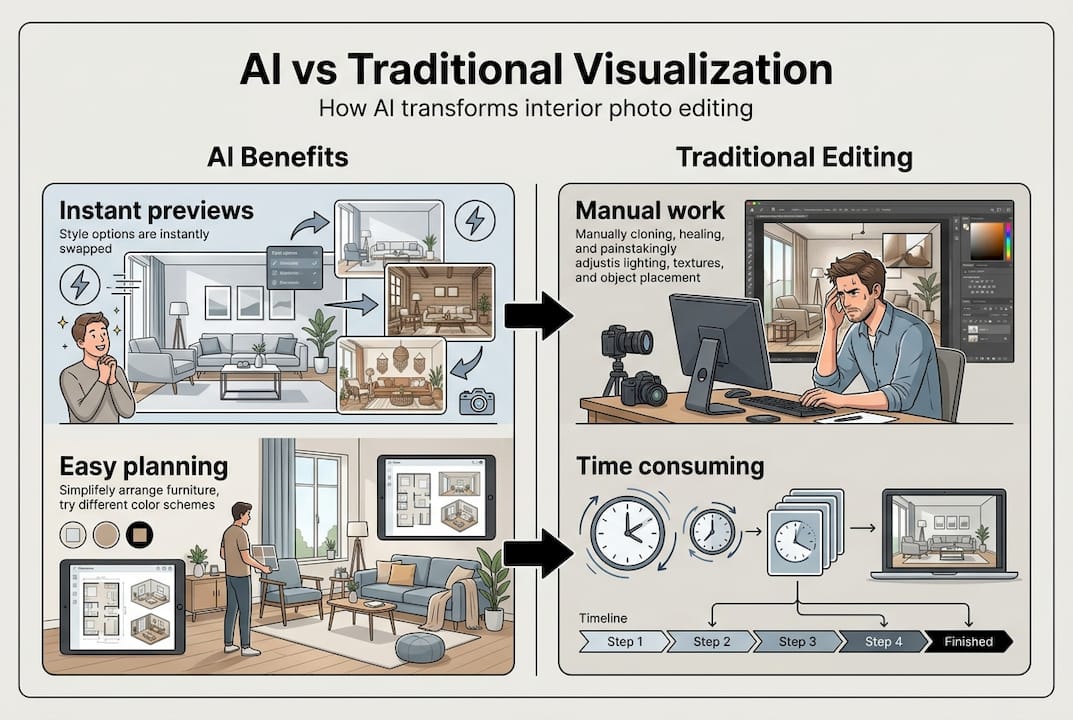
Traditional photo editing, whether done by a professional or through software like Photoshop, requires skill, time, and often a significant budget. A professional interior photo edit can cost hundreds of dollars and take days to complete. AI changes that equation entirely.
“AI democratizes design, making advanced visualization cost-effective for homeowners, but lacks emotional and precise customization.”
Here’s a direct comparison to help you decide which approach fits your needs:
| Feature | AI photo editing | Traditional editing |
|---|---|---|
| Speed | Under 30 seconds | Hours to days |
| Cost | Low to free | $50 to $500+ per edit |
| Skill required | None | Moderate to advanced |
| Customization | Prompt-based, iterative | Highly precise, manual |
| Emotional nuance | Limited | High |
| Volume of edits | Unlimited, fast | Time-constrained |
| Accessibility | Any device, any skill level | Requires software or professional |
The table makes it clear: AI wins on speed, cost, and accessibility. Traditional editing wins when you need highly specific, emotionally nuanced results. For most homeowners and DIY renovators, AI is the practical choice for planning and visualization. You can always bring in a professional for final touches once you know exactly what you want.
Exploring how to transform your space with AI can help you understand the full range of what’s possible. For a structured workflow, the seamless photo editing guide walks you through the process from upload to final preview.
AI benefits for homeowners: Visualization, planning, and renovation decisions
The biggest advantage AI gives homeowners is the ability to see before you spend. Renovation mistakes are expensive. Painting a room the wrong color, buying furniture that doesn’t fit, or choosing flooring that clashes with your cabinets are all common and costly errors. AI previews let you catch those mistakes before they happen.

AI-generated previews help visualize changes before spending on renovations, giving you a realistic look at the outcome without any commitment. This is especially valuable for DIY renovators who are working with tight budgets and can’t afford to redo work.
Here’s a breakdown of the most practical benefits:
| Benefit | What it means for you |
|---|---|
| Instant visualization | See color, furniture, and layout changes in seconds |
| Mistake prevention | Catch design errors before buying materials |
| Budget planning | Prioritize changes based on visual impact |
| Design confidence | Make decisions with visual proof, not guesswork |
| Multiple options | Compare several looks side by side |
For homeowners exploring what’s possible, interior redesign ideas can spark inspiration before you even open an AI tool. Once you’re ready to edit, the photo editing tutorial provides a hands-on walkthrough. And if lighting is a concern, lighting adjustment tips will help you get the most realistic previews possible.
Pro Tip: When testing color changes, always run the AI preview under both warm and cool lighting conditions. The same paint color can look completely different depending on your room’s natural light, and AI tools can simulate both scenarios instantly.
Getting started: How to use AI tools for interior photo enhancement
Getting started is simpler than most people expect. You don’t need design experience or technical skills. Here’s a step-by-step process that works for first-time users:
- Choose the right tool. Select an AI photo editor built specifically for interior design. General-purpose editors won’t understand room context the way specialized tools do.
- Upload a clear room photo. Use a well-lit, wide-angle shot that captures as much of the room as possible. The more the AI can see, the better its suggestions will be.
- Write your prompt. Describe what you want to change. Be specific: “Replace the gray sofa with a navy blue sectional” works better than “change the furniture.”
- Review the preview. Look at the generated image critically. Does the scale feel right? Does the lighting match your room? Does the style fit your vision?
- Refine with new prompts. Adjust lighting, swap materials, or try a different color. AI produces scale-aware and lit previews through iterative prompting, so each round gets you closer to your ideal result.
- Save your favorites. Keep multiple versions so you can compare options and share them with contractors or family members.
For a deeper understanding of how natural language drives these tools, the natural language photo editing guide explains the mechanics in plain terms. When you’re ready to try it yourself, the AI photo editor for interiors is a practical starting point.
Pro Tip: Always double-check AI suggestions for real-world feasibility. AI can miss context, like whether a wall is load-bearing or whether a piece of furniture will actually fit through your door. Use the previews as inspiration, not as a final blueprint.
Advanced tips: Making the most of AI-enhanced interiors
Once you’ve run a few basic edits, you’re ready to use AI more strategically. The most effective approach combines AI speed with your own design instincts.
AI excels in speed and scalability but lags in emotional and precise customization. That gap is where your judgment matters most. Use AI to generate options quickly, then filter them through your personal taste and practical knowledge of your space.
Here are strategies that experienced users rely on:
- Layer your prompts. Start with big changes like wall color or flooring, then refine smaller details like trim, lighting fixtures, and accessories in follow-up prompts.
- Share previews for feedback. Post your AI-generated images in home design communities or share them with friends. Crowd-sourced reactions often reveal things you’d miss on your own.
- Compare before and after. Keep your original room photo alongside every AI output. This makes it easy to evaluate how much each change actually improves the space.
- Mix styles intentionally. Ask AI to blend two styles, like Scandinavian and industrial, and see what it produces. Sometimes the unexpected combinations are the most interesting.
- Use AI for seasonal updates. Swap out textiles, lighting, and accent colors to preview how your space would feel in different seasons without buying anything.
Pro Tip: Save every AI output, even the ones you don’t like. Bad results often reveal what you don’t want, which is just as valuable as knowing what you do want.
For more inspiration on what AI can do for your space, transform your space with AI covers creative applications you might not have considered.
Transform your space with VibeMyFlat’s AI photo editor
Everything covered in this guide, from iterative prompting to lighting simulation and material swaps, is exactly what VibeMyFlat is built to deliver. The platform lets you upload a photo of any room and describe your ideal changes in plain language. No design degree required. No complicated software to learn.

VibeMyFlat processes your edits in under 30 seconds and gives you professional-quality previews you can actually use for renovation planning. Whether you want to test five different paint colors or reimagine your entire living room layout, the AI photo editor app makes it fast and intuitive. If you’re a DIY renovator looking for practical guidance alongside the tool, the editing tips for DIY blog covers everything from beginner basics to advanced techniques. Your next renovation starts with a single photo.
Frequently asked questions
Can AI help me visualize different furniture arrangements in my living room?
Yes, AI photo editors can suggest and preview various furniture setups in your room photos using computer vision and iterative prompting. AI analyzes room photos to suggest furniture placements based on your space’s layout and dimensions.
Is AI-based interior photo editing affordable for DIY renovators?
Most AI tools are significantly more cost-effective than hiring professional editors, making them a practical choice for homeowners on a budget. AI democratizes design and offers visualization at a fraction of traditional costs.
Does AI photo editing replace professional designers?
AI accelerates visualization but cannot fully replicate human creativity and emotional nuance, so it works best alongside professional expertise rather than instead of it. AI lacks emotional customization but excels in speed and the ability to generate multiple options quickly.
How does AI adjust lighting and scale in interior photos?
AI uses computer vision algorithms to detect existing light sources and spatial dimensions, then refines both through iterative prompting. Iterative prompting refines scale-aware, realistically lit previews with each round of feedback you provide.
Can I use AI to preview color and material changes before renovating?
Absolutely. AI tools let you experiment with paint colors, flooring materials, and fabric finishes directly on your room photos before spending a dollar. AI suggests colors and materials based on what it detects in your existing space, making the previews feel realistic and relevant.