Seamless photo editing: A guide for real estate pros
Seamless photo editing: A guide for real estate pros

Real estate professionals and interior designers often assume seamless photo editing is just basic retouching. It’s actually sophisticated AI technology that reconstructs image areas without visible seams or artifacts. This guide explains how AI inpainting works, its applications in property visualization, common pitfalls, and proven workflows to achieve professional results. You’ll learn practical techniques to enhance listings, comply with disclosure rules, and combine AI efficiency with human judgment for stunning property images.
Table of Contents
- Key takeaways
- Understanding what seamless photo editing really is
- How seamless photo editing transforms real estate and interior design visuals
- Challenges and nuances in achieving truly seamless edits
- Practical tips for mastering seamless photo editing workflows
- Discover AI-driven photo editing with VibeMyFlat
- Frequently asked questions
Key Takeaways
| Point | Details |
|---|---|
| Seamless AI inpainting basics | Seamless photo editing uses AI inpainting to fill removed or altered areas without visible seams by analyzing surrounding textures, lighting, and perspective with diffusion models and neural networks. |
| Real estate and interior use | In real estate and interior design it enables object removal, virtual staging, and sky replacement to enhance listing visuals. |
| Hybrid AI human workflows | Challenges include edge artifacts and MLS disclosure requirements, so successful workflows blend AI results with human review and clear compliance checks. |
| Masking and denoising tips | Masking and denoising practices improve results, such as using generous masks, reviewing edits at full zoom, and applying multiple refinement passes. |
Understanding what seamless photo editing really is
Seamless photo editing represents a fundamental shift from traditional retouching. AI inpainting analyzes the context around selected areas, understanding textures, lighting patterns, and spatial relationships to generate photorealistic fills. Unlike clone stamp tools that copy pixels, AI predicts what should exist in empty or modified spaces based on learned patterns from millions of images.
The technology relies on diffusion models and neural networks trained on diverse visual datasets. When you select an object to remove, the AI examines surrounding pixels in multiple dimensions. It considers color gradients, shadow directions, texture grain, and perspective lines. The system then generates new pixels that match these contextual clues, creating fills that blend seamlessly with the original photograph. This process happens in milliseconds, delivering results that would take human editors hours to achieve manually.
Masking plays a crucial role in quality outcomes. The AI needs clear boundaries to understand what to preserve and what to reconstruct. Generous masks that extend slightly beyond target objects give the algorithm more contextual information, reducing edge artifacts. The system also applies multiple passes, refining its predictions with each iteration to eliminate inconsistencies.
Pro Tip: Always review AI edits at 100% zoom to catch subtle artifacts around edges, especially in areas with complex textures like brick walls or foliage. These small details separate professional results from amateur attempts.
Key technical elements include:
- Diffusion models that gradually denoise random patterns into coherent images matching surrounding context
- Convolutional neural networks analyzing spatial relationships across image layers
- Attention mechanisms focusing computational power on complex areas requiring detailed reconstruction
- Iterative refinement loops that progressively improve fill quality through multiple passes
The AI photo editor app approach prioritizes natural language interaction, letting you describe desired changes rather than manually selecting tools. This democratizes professional editing capabilities for real estate agents and homeowners who lack technical training. The underlying AI still performs the same sophisticated inpainting, but the interface removes barriers to entry.
Understanding these foundations helps you set realistic expectations. AI excels at straightforward object removal and texture extension but struggles with highly complex lighting scenarios or intricate architectural details. Knowing when to rely on AI and when to involve human expertise separates effective workflows from frustrating ones.
How seamless photo editing transforms real estate and interior design visuals
Applied AI photo editing revolutionizes property marketing by enabling rapid visual enhancements that previously required expensive professional services. Object removal eliminates distracting elements like trash cans, utility poles, or personal items cluttering rooms. Virtual staging populates empty spaces with furniture and decor, helping buyers visualize potential. Sky replacement transforms dull gray overcast into vibrant blue, dramatically improving curb appeal.
Real estate professionals leverage these capabilities to create consistent, attractive listing portfolios. HDR merging combines multiple exposures, balancing bright windows with darker interiors for natural-looking results. Perspective correction fixes distorted vertical lines caused by wide-angle lenses, making rooms appear properly proportioned. These enhancements maintain photographic integrity while presenting properties in their best light.

MLS compliance remains critical. Most multiple listing services require disclosure when images contain virtual staging or significant alterations. Watermarking virtually staged photos and noting modifications in listing descriptions protects agents from legal issues. The goal is enhancement, not deception. Buyers deserve accurate representations, even when AI creates compelling visuals.
Interior designers use seamless editing to present concepts without physical changes. Testing paint colors, flooring options, or furniture arrangements becomes instant and reversible. Clients see realistic mockups before committing to purchases or renovations. This visualization capability reduces decision anxiety and speeds project approvals.
The modern interior design workflow increasingly incorporates AI editing as a standard presentation tool. Designers capture existing spaces, apply proposed changes digitally, and share side-by-side comparisons. This approach saves time and money compared to creating physical samples or elaborate 3D renders. The photorealistic quality builds client confidence in design directions.
Practical applications include:
- Removing dated fixtures or furniture to showcase architectural features
- Changing wall colors, flooring materials, or window treatments to match client preferences
- Adding or removing walls digitally to explore layout alternatives
- Enhancing natural light appearance through strategic brightness and color temperature adjustments
- Creating seasonal variations showing properties in different weather conditions
The AI photo editing for interiors platform streamlines these tasks with intuitive controls. Real estate photographers can process entire shoots in minutes rather than hours. Interior designers iterate through multiple concepts during client meetings, making real-time adjustments based on feedback. Homeowners planning renovations visualize changes before breaking ground, reducing costly mistakes.
Speed matters in competitive markets. Listings with high-quality images receive more views and sell faster. AI editing delivers professional results on tight timelines, giving agents a competitive advantage. The technology handles routine enhancements automatically, freeing human expertise for strategic decisions about composition, staging, and marketing angles.
Challenges and nuances in achieving truly seamless edits
Small objects and shadows create significant challenges for AI inpainting. The algorithms struggle with fine details requiring pixel-level precision. Removing a small item might leave a faint outline or color cast. Complex lighting and textures cause hallucinations where the AI generates plausible but incorrect patterns. Over-editing produces unnatural results that damage credibility and violate MLS rules.
Artifacts appear as subtle inconsistencies in texture, lighting, or perspective. A virtually staged room might show furniture with impossible shadows or reflections that don’t match light sources. Removed objects sometimes leave ghostly outlines or color shifts. These flaws become obvious to trained eyes, even if casual viewers miss them initially.
Lighting complexity poses particular problems. AI trained on evenly lit images struggles with dramatic shadows, mixed color temperatures, or strong directional light. The system might generate fills that match surrounding colors but fail to replicate shadow gradients or highlight patterns. This creates floating objects that appear pasted rather than naturally integrated.
MLS compliance demands transparency about virtual staging and significant alterations. Most services require clear labeling of edited images. Failing to disclose modifications risks legal action from buyers who feel misled. The line between acceptable enhancement and deceptive alteration varies by jurisdiction and listing service, requiring careful attention to local rules.
“The problem with AI-generated real estate images is they can create unrealistic expectations. When buyers visit properties that don’t match the polished online photos, trust erodes. Agents must balance attractive marketing with honest representation to maintain professional integrity and avoid legal issues.” — Real estate photography expert quoted in Wired investigation
Over-editing creates the “AI slop” problem where images look artificially perfect. Buyers increasingly recognize these manipulations, leading to skepticism about listing accuracy. Properties shown with impossibly perfect lighting, furniture, or landscaping set expectations that physical viewings can’t meet. This disconnect frustrates buyers and wastes everyone’s time.
Human review remains essential for quality control. AI generates initial edits quickly, but experienced eyes catch problems the algorithm misses. Professional photographers and editors identify perspective issues, lighting inconsistencies, and unnatural color casts. This hybrid workflow combines AI efficiency with human judgment, delivering results that satisfy both speed and quality requirements.
Common pitfalls include:
- Removing load-bearing walls or structural elements in virtual renovations, creating impossible layouts
- Adding furniture at incorrect scales, making rooms appear larger or smaller than reality
- Applying inconsistent lighting across multiple images of the same property
- Over-smoothing textures until they lose realistic detail and appear plastic
- Ignoring perspective rules, placing objects at angles that defy spatial logic
The photo editing app features include safeguards against common errors, but user judgment remains critical. Understanding these limitations helps you set realistic expectations and develop workflows that minimize problems. When AI produces questionable results, manual refinement or professional retouching becomes necessary.
Ethical considerations extend beyond legal compliance. Real estate professionals build reputations on trustworthiness. Excessive manipulation undermines that trust, even when technically disclosed. The goal should be presenting properties accurately while highlighting genuine strengths, not creating fantasy versions that disappoint in person.
Practical tips for mastering seamless photo editing workflows
Effective workflows combine AI capabilities with strategic human oversight. Start by capturing high-quality source images with proper exposure, sharp focus, and minimal distortion. AI can enhance good photos but struggles to rescue poor ones. Shoot in RAW format when possible, preserving maximum detail for editing flexibility.
Masking techniques significantly impact results. Use generous selections that extend beyond target objects, giving the AI more contextual information. Feather mask edges to create gradual transitions rather than hard boundaries. For complex objects like furniture with legs or intricate details, create precise masks using polygon tools rather than quick selections.
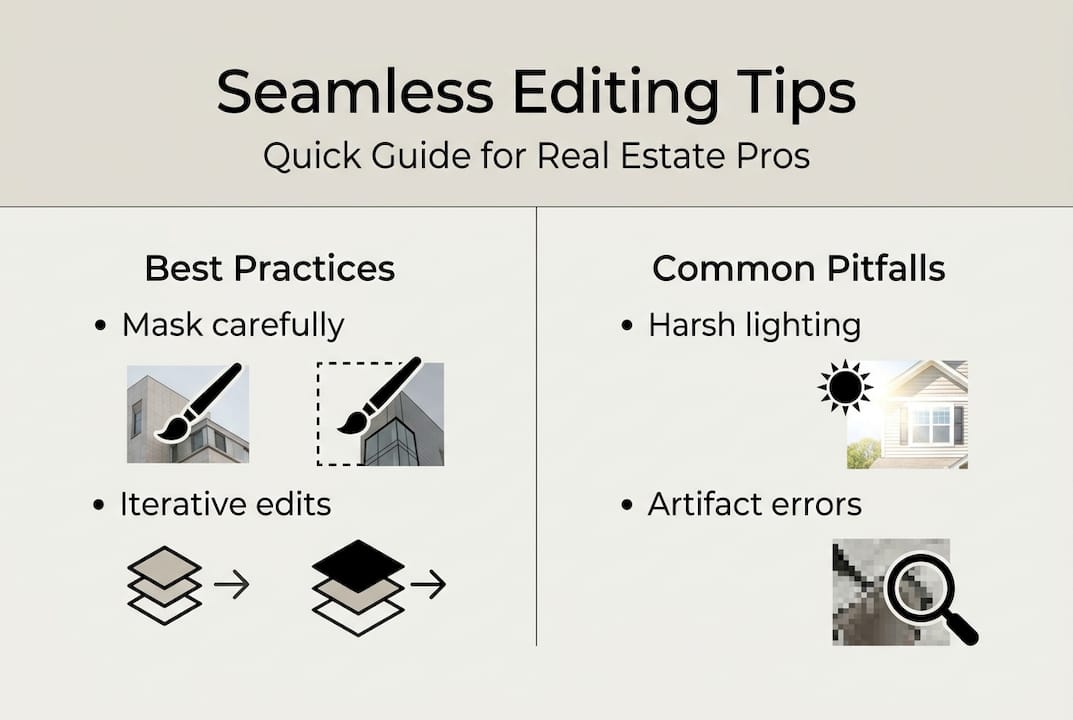
Iterative editing passes produce better results than single aggressive edits. Make conservative changes, review the output, then refine as needed. This approach prevents overcorrection and maintains natural appearance. Each pass allows the AI to build on previous work, progressively improving quality.
Recommended denoising strength ranges from 0.3 to 0.7 for most real estate applications. Lower values preserve more original detail but may leave visible seams. Higher values give the AI more creative freedom but risk generating unrealistic textures. Start at 0.5 and adjust based on specific image characteristics.
Pro Tip: When removing large objects, work in sections rather than attempting one massive edit. Break the task into smaller areas, allowing the AI to focus computational power on each region. This reduces artifacts and improves overall consistency.
Step-by-step workflow for optimal results:
- Assess the image and identify specific enhancements needed, prioritizing changes that add genuine value
- Create precise masks around target areas using appropriate selection tools for object complexity
- Apply initial AI inpainting with moderate denoising strength, reviewing results at full resolution
- Refine masks and repeat editing passes on areas showing artifacts or inconsistencies
- Combine with HDR merging, perspective correction, and color grading for comprehensive enhancement
- Conduct final human review, checking lighting consistency, shadow accuracy, and overall realism
- Add required disclosures or watermarks for virtually staged or significantly altered images
Combining AI with supporting tools maximizes quality. HDR merging balances exposure across the image before applying inpainting. Perspective correction ensures straight lines and proper proportions. Color grading creates consistent mood across listing photos. These complementary techniques work together, with AI handling specific reconstruction tasks within a broader enhancement strategy.
The interior design AI editor streamlines this process through integrated tools and natural language controls. Describe desired changes in plain English, and the system applies appropriate techniques automatically. This accessibility doesn’t eliminate the need for understanding best practices, but it reduces technical barriers.
Comparison of common editing approaches:
| Technique | Speed | Quality | Best Use Case | Limitations |
|---|---|---|---|---|
| AI inpainting | Very fast | Good to excellent | Object removal, texture extension | Struggles with complex lighting |
| Manual clone stamp | Slow | Excellent with skill | Precise detail work | Time-intensive, requires expertise |
| Virtual staging | Fast | Good | Empty room furnishing | Requires disclosure, can appear artificial |
| HDR merging | Moderate | Excellent | Balancing interior/exterior exposure | Needs multiple source images |
| Perspective correction | Fast | Excellent | Fixing wide-angle distortion | Limited to geometric adjustments |
Professional workflows increasingly adopt hybrid approaches. AI handles routine tasks like object removal and basic staging. Human editors focus on quality control, complex scenarios, and artistic decisions. This division of labor maximizes efficiency while maintaining professional standards.
Testing and iteration improve results over time. Build a reference library of successful edits, noting techniques that worked well for specific situations. Document problem areas and solutions for future reference. This knowledge base accelerates workflow development and reduces trial-and-error.
The professional comparison between AI and traditional editing shows convergence. AI now handles many tasks previously requiring human expertise, but professional judgment remains valuable for complex scenarios and quality assurance. The most effective approach combines both, leveraging AI speed with human creativity and oversight.
Discover AI-driven photo editing with VibeMyFlat
Ready to implement these seamless editing techniques in your real estate or design practice? VibeMyFlat AI editor delivers professional inpainting, virtual staging, and enhancement tools optimized for property visualization. The platform processes edits in under 30 seconds, letting you transform listings during client meetings or property shoots.

The natural language interface eliminates technical barriers. Describe desired changes in plain English, and the AI applies appropriate techniques automatically. Remove furniture, change wall colors, enhance lighting, or stage empty rooms without complex software training. The system handles masking, denoising, and iterative refinement behind the scenes, delivering polished results ready for MLS upload.
Key benefits include:
- Rapid processing enabling same-day listing enhancements
- Mobile and web access for editing anywhere, on any device
- Built-in compliance tools for proper virtual staging disclosure
- Intuitive controls suitable for professionals and homeowners alike
Whether you’re a real estate agent seeking competitive advantage, an interior designer presenting concepts, or a homeowner planning renovations, VibeMyFlat provides the AI-powered editing capabilities this guide describes. Try the platform on your next project and experience how seamless photo editing transforms property marketing and design visualization.
Frequently asked questions
What is seamless photo editing?
Seamless photo editing uses AI inpainting to reconstruct or fill image areas without visible seams or artifacts. The technology analyzes surrounding textures, lighting, and patterns to generate photorealistic fills that blend indistinguishably with original content. Unlike traditional clone stamp tools, AI predicts what should exist in modified areas based on contextual understanding.
How can seamless photo editing benefit real estate listings?
This technology enables rapid object removal, virtual staging, sky replacement, and lighting enhancements that make properties more attractive to buyers. Listings with professionally edited images receive more views and sell faster. The AI processes entire photo shoots in minutes, delivering consistent quality across all listing images while maintaining MLS compliance through proper disclosure.
What challenges should users be aware of when using AI photo editing?
Common issues include artifacts from complex textures and shadows, over-editing causing unnatural effects, and lighting mismatches that make objects appear pasted rather than integrated. Users must maintain MLS disclosure requirements for virtual staging and verify all edits with human review. Small details and intricate architectural elements often require manual refinement beyond initial AI output.
What are best practices for achieving seamless results?
Use generous masks extending beyond target objects, moderate denoising strength between 0.3 and 0.7, and iterative editing passes for progressive refinement. Combine AI inpainting with supporting tools like HDR merging and perspective correction for comprehensive enhancement. Always conduct final human review to catch subtle artifacts and ensure realistic lighting consistency across all edited areas.